

AI生成代码,功能:将单张图片切图成9张小图片,或者生成1张九宫格样式的图片,将代码复制保存为1.html格式在本地,或者上传到服务器,直接打开使用。
<!DOCTYPE html>
<html lang="zh-CN">
<head>
    <meta charset="UTF-8">
    <meta name="viewport" content="width=device-width, initial-scale=1.0">
    <title>朋友圈九宫格切图工具</title>
    <style>
        * {
            margin: 0;
            padding: 0;
            box-sizing: border-box;
            font-family: "Microsoft YaHei", sans-serif;
        }

        body {
            background-color: #f5f5f5;
            padding: 20px;
            max-width: 600px;
            margin: 0 auto;
        }

        .container {
            background: white;
            padding: 30px;
            border-radius: 15px;
            box-shadow: 0 2px 15px rgba(0,0,0,0.1);
        }

        .title {
            text-align: center;
            color: #333;
            margin-bottom: 25px;
            font-size: 24px;
        }

        .upload-area {
            border: 2px dashed #ccc;
            border-radius: 10px;
            padding: 40px 20px;
            text-align: center;
            cursor: pointer;
            margin-bottom: 20px;
            transition: all 0.3s;
        }

        .upload-area:hover {
            border-color: #07c160;
            background-color: #f9fff9;
        }

        .upload-area.hidden {
            display: none;
        }

        #fileInput {
            display: none;
        }

        .action-buttons {
            display: flex;
            gap: 10px;
            margin-bottom: 20px;
        }

        .btn {
            flex: 1;
            padding: 12px;
            border: none;
            border-radius: 8px;
            font-size: 16px;
            cursor: pointer;
            transition: all 0.2s;
        }

        .delete-btn {
            background-color: #ff4d4f;
            color: white;
        }

        .reupload-btn {
            background-color: #1677ff;
            color: white;
        }

        .download-btn {
            width: 100%;
            background-color: #07c160;
            color: white;
            margin-bottom: 10px;
        }

        .generate-full-btn {
            width: 100%;
            background-color: #722ed1;
            color: white;
            margin-bottom: 20px;
        }

        .grid-container {
            display: grid;
            grid-template-columns: repeat(3, 1fr);
            gap: 8px;
            margin-top: 20px;
        }

        .grid-item {
            width: 100%;
            border-radius: 12px;
            overflow: hidden;
        }

        .grid-item img {
            width: 100%;
            height: auto;
            display: block;
        }

        #fullPreview {
            display: none;
            margin-top: 20px;
            text-align: center;
        }

        #fullImage {
            max-width: 100%;
            border-radius: 10px;
            border: 2px solid #eee;
        }

        .tip {
            text-align: center;
            color: #888;
            font-size: 14px;
            margin-top: 15px;
        }
    </style>
</head>
<body>
    <div class="container">
        <h1 class="title">朋友圈九宫格切图</h1>

        <div class="upload-area" id="uploadArea">
            <div style="font-size:40px; margin-bottom:10px">📷</div>
            <div>点击上传图片</div>
            <input type="file" id="fileInput" accept="image/*">
        </div>

        <div class="action-buttons" id="actionBtns" style="display:none">
            <button class="btn delete-btn">删除图片</button>
            <button class="btn reupload-btn">重新上传</button>
        </div>

        <button class="btn download-btn" style="display:none">下载全部9张图片</button>
        <button class="btn generate-full-btn" style="display:none">生成整张九宫格效果图</button>

        <div id="fullPreview">
            <img id="fullImage">
        </div>

        <div class="grid-container" id="gridContainer"></div>

        <div class="tip">
            保持原图比例 · 圆角间隔与预览完全一致
        </div>
    </div>

    <script>
        const uploadArea = document.getElementById('uploadArea');
        const fileInput = document.getElementById('fileInput');
        const gridContainer = document.getElementById('gridContainer');
        const fullImage = document.getElementById('fullImage');
        const fullPreview = document.getElementById('fullPreview');

        let gridImages = [];
        let originImg;

        // ================== 核心调整:间距拉大 + 圆角变大 ==================
        const GAP = 20;        // 整张效果图的间距(拉大了)
        const RADIUS = 14;     // 所有小图的圆角(全部变成圆角)

        // 上传
        uploadArea.onclick = () => fileInput.click();
        fileInput.onchange = async (e) => {
            const file = e.target.files[0];
            if (!file) return;

            const img = new Image();
            img.src = URL.createObjectURL(file);
            await new Promise(res => img.onload = res);
            originImg = img;

            await splitImage(img);
            showBtns();
            uploadArea.classList.add('hidden');
        };

        // 切割九宫格 —— 完全保持原图比例
        async function splitImage(img) {
            gridContainer.innerHTML = '';
            gridImages = [];

            const w = img.width;
            const h = img.height;
            const cw = w / 3;
            const ch = h / 3;

            for (let row = 0; row < 3; row++) {
                for (let col = 0; col < 3; col++) {
                    const canvas = document.createElement('canvas');
                    canvas.width = cw;
                    canvas.height = ch;
                    const ctx = canvas.getContext('2d');
                    ctx.drawImage(img, col * cw, row * ch, cw, ch, 0, 0, cw, ch);
                    const url = canvas.toDataURL('image/png');
                    gridImages.push(url);

                    const item = document.createElement('div');
                    item.className = 'grid-item';
                    item.innerHTML = `<img src="${url}">`;
                    gridContainer.appendChild(item);
                }
            }
        }

        // 删除
        document.querySelector('.delete-btn').onclick = () => {
            if (!confirm('确定删除?')) return;
            gridContainer.innerHTML = '';
            gridImages = [];
            fullPreview.style.display = 'none';
            fileInput.value = '';
            uploadArea.classList.remove('hidden');
            hideBtns();
        };

        // 重传
        document.querySelector('.reupload-btn').onclick = () => fileInput.click();

        // 下载9张
        document.querySelector('.download-btn').onclick = () => {
            gridImages.forEach((url, i) => {
                const a = document.createElement('a');
                a.href = url;
                a.download = `九宫格_${i+1}.png`;
                setTimeout(() => a.click(), i * 100);
            });
        };

        // 生成整张九宫格效果图
        document.querySelector('.generate-full-btn').onclick = async () => {
            const w = originImg.width;
            const h = originImg.height;
            const cw = w / 3;
            const ch = h / 3;

            const canvas = document.createElement('canvas');
            canvas.width = w + GAP * 4;
            canvas.height = h + GAP * 4;
            const ctx = canvas.getContext('2d');

            ctx.fillStyle = "#ffffff";
            ctx.fillRect(0, 0, canvas.width, canvas.height);

            for (let i = 0; i < 9; i++) {
                const row = Math.floor(i / 3);
                const col = i % 3;
                const img = await loadImg(gridImages[i]);

                const x = GAP + col * (cw + GAP);
                const y = GAP + row * (ch + GAP);

                ctx.save();
                roundRect(ctx, x, y, cw, ch, RADIUS);
                ctx.clip();
                ctx.drawImage(img, x, y, cw, ch);
                ctx.restore();
            }

            const res = canvas.toDataURL('image/png');
            fullImage.src = res;
            fullPreview.style.display = 'block';

            const a = document.createElement('a');
            a.href = res;
            a.download = '九宫格_完整效果图.png';
            a.click();
        };

        function roundRect(ctx, x, y, w, h, r) {
            ctx.beginPath();
            ctx.moveTo(x + r, y);
            ctx.arcTo(x + w, y, x + w, y + h, r);
            ctx.arcTo(x + w, y + h, x, y + h, r);
            ctx.arcTo(x, y + h, x, y, r);
            ctx.arcTo(x, y, x + w, y, r);
            ctx.closePath();
        }

        function loadImg(src) {
            return new Promise(res => {
                const img = new Image();
                img.onload = () => res(img);
                img.src = src;
            });
        }

        function showBtns() {
            document.getElementById('actionBtns').style.display = 'flex';
            document.querySelector('.download-btn').style.display = 'block';
            document.querySelector('.generate-full-btn').style.display = 'block';
        }

        function hideBtns() {
            document.getElementById('actionBtns').style.display = 'none';
            document.querySelector('.download-btn').style.display = 'none';
            document.querySelector('.generate-full-btn').style.display = 'none';
        }
    </script>
</body>
</html>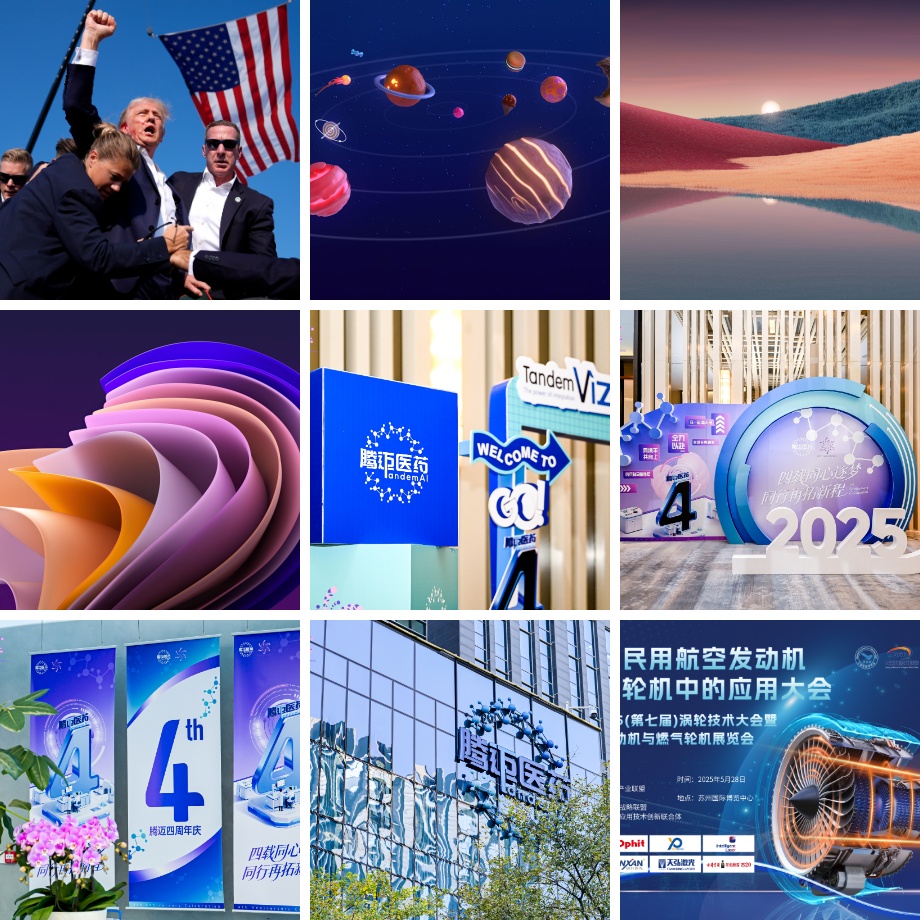





《微信朋友圈单张图片切图成九宫格》等您坐沙发呢!